Let’s be honest — the word “serverless” is a bit misleading. There are definitely servers involved. You just don’t have to manage them yourself, and that’s the whole point.
If you’ve been building web applications for a while, you know the drill. You rent a server (or a virtual machine), install your software, configure everything, and then spend a surprising amount of time keeping it running — patching the operating system, monitoring for crashes, scaling up when traffic spikes, and scaling back down when it doesn’t. It’s a lot of work that has nothing to do with the actual product you’re building.
Serverless computing flips that model. You write your code, upload it, and AWS handles everything else. You’re billed only for the exact milliseconds your code runs. When nobody is using your app, you pay nothing.
The Three Core Services You Need to Know
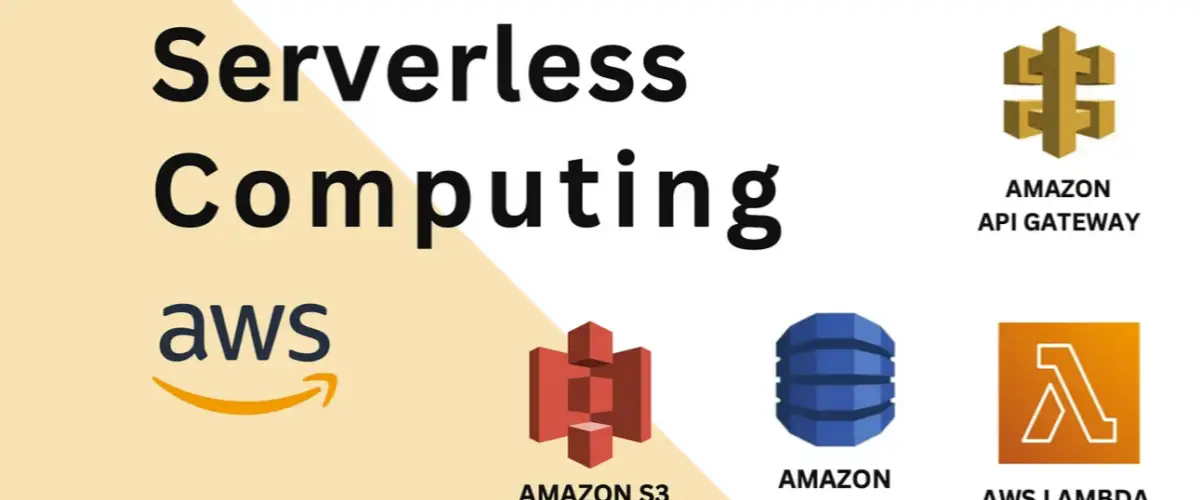
AWS serverless architecture is built around three services that work together beautifully. Understanding each one helps the whole picture click.
AWS Lambda — Your Code Runs on Demand
Lambda is the heart of serverless on AWS. You write a function — just a regular block of code — and Lambda runs it whenever something triggers it. That trigger could be an HTTP request, a file being uploaded to S3, a message in a queue, a scheduled timer, or dozens of other events.
Here’s a simple Lambda function in Python that returns a greeting:
def lambda_handler(event, context):
    name = event.get('name', 'World')
    return {
        'statusCode': 200,
        'body': f'Hello, {name}!'
    }
That’s it. No server setup. No port configuration. No framework boilerplate. Just logic. Lambda supports Python, Node.js, Java, Go, Ruby, and .NET out of the box.
The key thing to understand about Lambda is the execution model. Each time your function is triggered, Lambda spins up a container, runs your code, and shuts it down. If a thousand people hit your API at the same time, Lambda spins up a thousand containers simultaneously. That’s automatic scaling — no configuration required.
API Gateway — The Door to Your Functions
Lambda functions don’t have public URLs by default. API Gateway is what gives them one. It acts as the front door for your application — receiving HTTP requests from browsers and mobile apps, routing them to the right Lambda function, and returning the response.
You define routes like you would in any web framework:
- GET /users → triggers your GetUsers Lambda function
- POST /users → triggers your CreateUser Lambda function
- DELETE /users/{id} → triggers your DeleteUser Lambda function
API Gateway also handles authentication, rate limiting, SSL certificates, and CORS headers — all without writing a single line of server code.
DynamoDB — The Database That Scales With You
Traditional relational databases (like PostgreSQL or MySQL) require a server running all the time — even when nobody is using them. That’s fine for many applications, but it breaks the serverless model where you want zero costs during idle time.
DynamoDB is AWS’s NoSQL database service. It’s fully managed, scales automatically, and has a pay-per-request pricing option that fits perfectly with serverless. No server to manage, no connection pooling to configure, and it can handle millions of requests per second without breaking a sweat.
A Real Example: Building a Simple Notes API
Let’s make this concrete. Imagine you’re building a notes app — users can create notes, read them, and delete them. Here’s how the serverless architecture looks:
A user opens your app and taps “Create Note.” Their request goes to API Gateway, which routes it to your SaveNote Lambda function. The function validates the input, saves the note to DynamoDB, and returns a success response. The whole round trip takes under 100 milliseconds.
When they open the app later and want to see their notes, the request goes to API Gateway → GetNotes Lambda → DynamoDB → back to the user. Simple, fast, and you pay only for those two Lambda executions and two DynamoDB reads.
If your app goes viral overnight and suddenly has 50,000 users instead of 50, nothing breaks. Lambda and DynamoDB scale automatically. You don’t get a 3am alert about your server running out of memory.
The Honest Pros and Cons
Serverless isn’t magic. Like every architectural choice, it comes with real trade-offs worth understanding before you commit.
The Genuine Advantages
Cost efficiency for variable workloads. If your application gets heavy traffic during business hours and almost none overnight, serverless can be dramatically cheaper than a server that runs 24/7. You pay for what you use, period.
No operational overhead. AWS handles operating system updates, security patches, hardware failures, and capacity planning. Your team focuses entirely on building features.
Automatic scaling. Whether you get 10 requests or 10 million, the architecture handles it without any manual intervention. This is genuinely impressive and removes a huge category of engineering work.
Faster deployment. Deploying a Lambda function takes seconds. You can update a single function without touching anything else in your application.
The Real Limitations
Cold starts. When Lambda hasn’t been invoked for a while, it needs to spin up a fresh container — a process that can take anywhere from a few hundred milliseconds to a couple of seconds. For latency-sensitive applications like real-time trading or gaming, this matters. AWS offers “Provisioned Concurrency” to solve this, but it costs more.
Execution time limits. Lambda functions can run for a maximum of 15 minutes. Long-running processes like video encoding, large data migrations, or complex machine learning inference need a different approach.
Local development is trickier. Testing serverless applications locally requires extra tooling like AWS SAM or LocalStack. You can’t just run your app on your laptop the same way you would a traditional server application.
Vendor lock-in. Lambda functions use AWS-specific patterns and the AWS SDK. Moving to a different cloud provider later involves real rewriting effort.
When Serverless Makes Sense (and When It Doesn’t)
Serverless is an excellent fit for APIs that handle variable traffic, background processing jobs (resizing images, sending emails, processing payments), scheduled tasks (daily reports, data cleanup), and event-driven workflows (responding to file uploads, database changes, or user actions).
It’s a poor fit for applications that need to maintain long-running connections (like real-time chat or multiplayer games), processes that run longer than 15 minutes, applications with very steady high traffic (where a traditional server is actually cheaper), and systems that need a local filesystem.
Getting Started Today
The best way to understand serverless is to build something small. AWS has a generous free tier — one million Lambda requests and 400,000 GB-seconds of compute time free every month. That’s enough to run a meaningful application for free while you’re learning.
Start by creating a free AWS account, then work through the AWS Lambda getting-started guide. Build a simple API with one Lambda function and one API Gateway endpoint. Once that works, add DynamoDB. Then add a second Lambda function. Each piece you add makes the whole model clearer.
The learning curve for serverless is front-loaded — the concepts feel unfamiliar at first. But once things click, most developers find it genuinely liberating to build features without ever thinking about the servers underneath them.